App retention rate is the share of users from one cohort who come back after a set number of days. To calculate day N retention, divide the users from an install cohort who were active on day N by the number of users in that cohort, then multiply by 100. If 10,000 people install on Monday and 3,800 of them open the app on Tuesday, day 1 retention is 38%.
The arithmetic is simple. Results differ between teams because of the choices behind it, such as which event starts the clock, what counts as coming back, and whether "day 7" means exactly day 7 or any day from day 7 on. Most of this guide is about those choices and what to do when the number moves.
What is the retention rate formula?
The standard day N retention formula for apps and games is
Day N retention = (users from the cohort active on day N ÷ users in the cohort) × 100
When you combine several cohorts into a weekly or monthly figure, divide the total retained users by the total users in those cohorts. A simple average of the daily percentages gives a small cohort the same weight as a large one.
Day 0 is the day of the first event, usually first open, install or registration. On a calendar-day basis day 1 is the next calendar day, and some teams use 24-hour intervals from the first event instead. Three variants are in common use.
| Variant | Formula | What it shows |
|---|---|---|
| Classic (day N) retention | Users active on exactly day N ÷ cohort size | Whether users come back on that specific day |
| Rolling retention | Users active on day N or any later day ÷ cohort size | Whether users ever come back after day N, even with gaps |
| Range retention | Users active at least once in a window, such as days 8 to 14 ÷ cohort size | Activity across a week or month, which gives a steadier read for apps people use weekly |
Subscription businesses often use a different customer retention rate formula, measured per billing period.
Customer retention rate = ((customers at the end of the period − new customers added during the period) ÷ customers at the start of the period) × 100
Subscription apps often need both, subscriber retention for billing and day N retention for usage. Report which one you used, because the two are not comparable.
Decide four things before you calculate
Retention numbers only compare well when everyone measures them the same way. Settle these four choices and write them next to the chart.
- The first event. Install, registration or first login. This sets which cohort each user belongs to. Install or first open suits acquisition reporting. Registration-based retention leaves out people who never registered, so pair it with the install-to-registration rate.
- The return event. Usually a login or a session start. Some teams use a core action, such as finishing a level or saving a document, so that opening the app and closing it straight away does not count.
- The entity. Accounts, devices, or in a game with several characters per account, characters. You might view the retention of in-game characters or the next-day retention of accounts, and the two can give very different numbers.
- The day boundary. Pick one time zone and say whether day 1 means the next calendar day or 24 hours after the first event. For a user who installs late in the evening, the day 1 window opens within hours, so calendar-day and 24-hour definitions can give different numbers for the same cohort.
Also leave out cohorts that are not old enough for the checkpoint, so a 20-day-old cohort never shows a D30 figure, and write down how you handle reinstalls and account merges, so each user is counted once under the entity you chose.
What do D1, D7 and D30 retention tell you?
Use each checkpoint for a different question, and read them together.
Day 1 retention shows whether users came back the next day. A weak D1 often traces to the first session, how the app runs on the device, or a mismatch between the ad and the product.
Day 7 retention gives an early read on the core loop, the main activity a user repeats, such as playing a level or logging a workout. Read it against how often people are expected to use the product. Split it by source, platform and app version before you put a change down to the core loop.
Day 30 retention shows whether users are still coming back a month in. Content updates, events, social features and, in games, the economy and LiveOps calendar weigh more here, alongside everything that happened earlier. We cover that side in our guide to LiveOps for live-service teams.
Plot all three as one curve per cohort. If the curve keeps falling steeply, check acquisition mix, onboarding and technical problems along with the core loop. If it flattens after the first week, the users who stayed have something they come back for, and how often they return will tell you how strong that is.
A worked cohort example
Here is an example retention table for five install days. The numbers are illustrative and should not be read as benchmarks.
| Install day | Installs | D1 | D7 | D30 |
|---|---|---|---|---|
| Oct 1 | 2,000 | 38% | 15% | 6% |
| Oct 2 | 2,200 | 37% | 14% | 6% |
| Oct 3 | 1,900 | 39% | 16% | 7% |
| Oct 4 | 2,400 | 31% | 11% | 4% |
| Oct 5 | 2,100 | 38% | 15% | 6% |
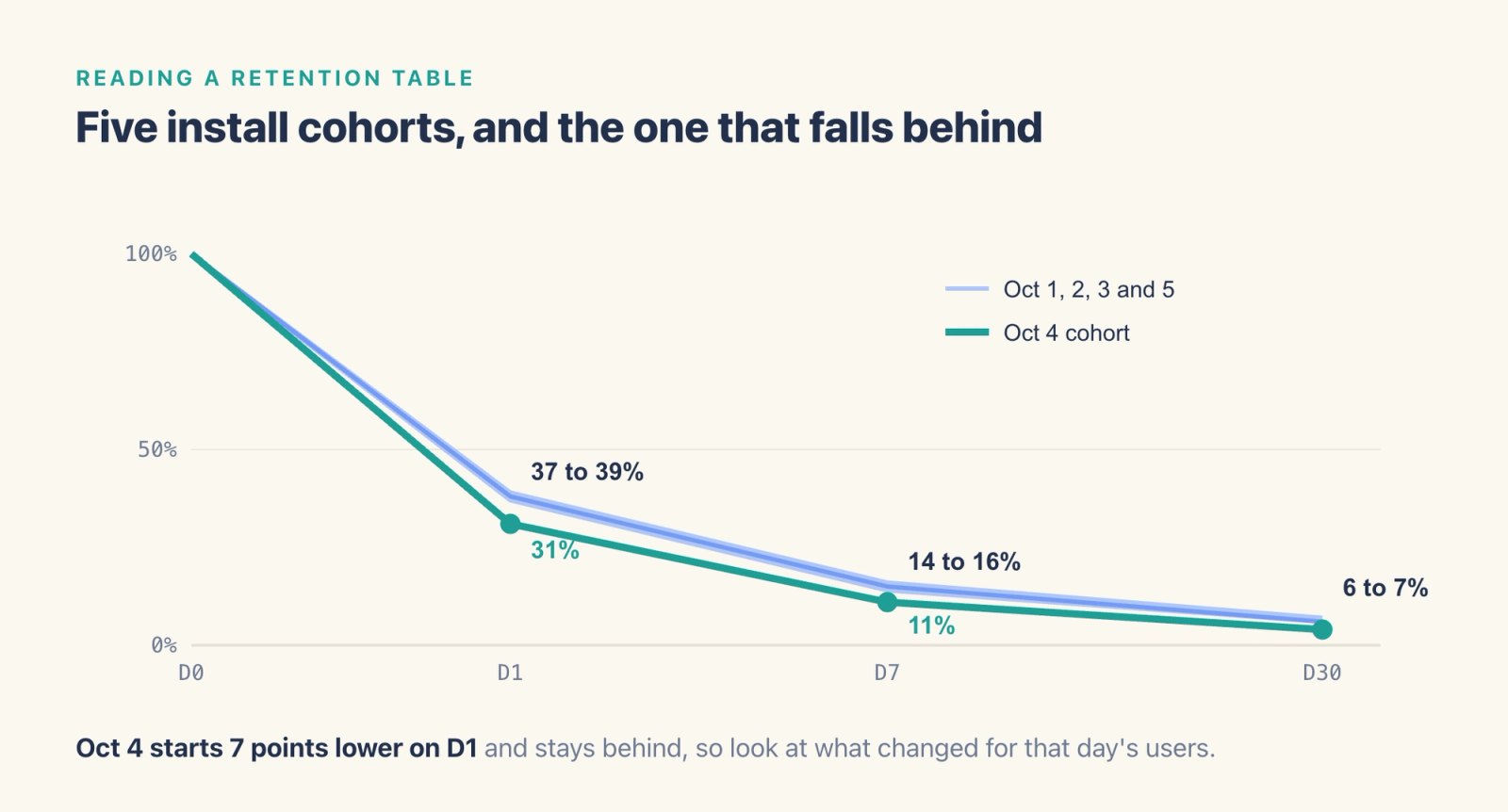
The Oct 4 cohort stands out. Its D1 retention is about 7 points below the other days, and the gap carries through to D7 and D30. That pattern usually comes from something specific to the users who arrived that day, such as a new campaign, a featured placement in an app store that brought in a different audience, or a build released that morning. If every cohort slides together, look at the product, the season and the tracking.
To read a table like this, compare each cohort with its neighbors at the same age, check whether the cohort was unusual in source, platform or app version, and only then look for causes inside the product.
Classic or rolling retention?
The same cohort can show very different day 7 numbers depending on the variant.
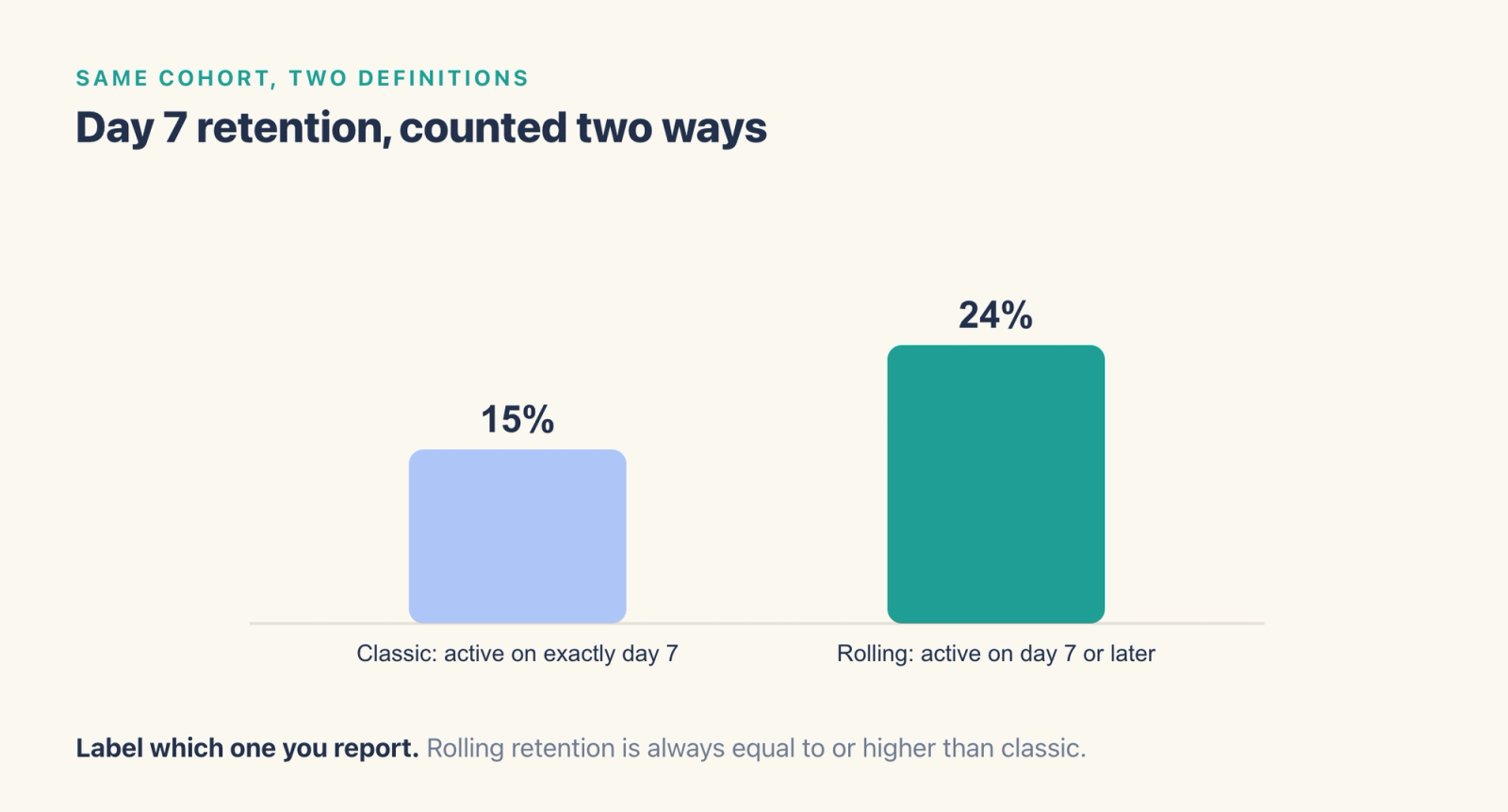
In this example, 15% of the cohort was active on day 7 exactly, while 24% came back on day 7 or later. Classic retention is stricter and reacts faster to change. Rolling retention counts any return on or after day N, so it is always equal to or higher than classic retention and suits apps people use a few times a week, such as fitness or finance apps. Recent cohorts have had less time to return, so compare rolling figures only across cohorts observed for the same length of time. Pick one for your main dashboard and label it, because comparing your classic D7 with someone else's rolling D7 will always make one of you look wrong.
What is a good retention rate?
There is no single good number, and published benchmarks vary widely because they use different definitions, samples and genres. The most useful comparisons are, in order,
- Your own earlier cohorts with the same source, platform and market. A drop of a few points against last month's cohorts is worth investigating in large cohorts. In small cohorts the same gap can be normal variation.
- Your category, if you can find a source that states its definition. Check whether a published figure is classic or rolling retention before comparing it with yours.
- The economics. Read retention alongside LTV, payback and acquisition cost. We walk through how retention feeds into LTV in our guide to calculating LTV for games and subscription apps.
Subscriber retention for paid plans is a separate measure from D1, D7 and D30 usage retention, and plan type changes it. RevenueCat's State of Subscription Apps 2025 reports that most apps with cheap annual plans keep up to 36% of users after a year, while high-priced monthly plans keep just 6.7%.
Teams at the start of a product's life often watch a small set of early signals. The Yumy team, for example, watches retention at day two and day seven, along with average session length and how often people open the app.
What to do when retention drops
Start from the checkpoint that dropped. You can follow the next-day churn workflow in our documentation.
- Use retention analysis with registration as the first event and login as the return event, and find the dates where next-day retention fell.
- Save the users who registered on that day, and the ones among them who did not log in the next day, as two separate cohorts.
- Compare the two groups in a funnel to see which step or level the churned users stopped at.
- Look at the paths churned users took from registration to find the last thing they did before they stopped.
Before you change the product, rule out tracking problems. A renamed event or a missing login event produces exactly the same pattern as a real drop. Use our guide to event tracking without SQL to verify events before you trust a chart.
How do you improve retention rate?
Pick the checkpoint tied to your product goal. Where you can, assign users at random to get the change or not, so a shift in who installed does not get mistaken for an improvement.
- To lift D1, shorten the path to the first moment of value. Count the steps between install and the core action, remove the ones that are not needed, and check where first-session users stop in a funnel.
- To lift D7, give users a reason to come back that is tied to what they already did, such as progress they can pick up again or a streak they want to keep. Reminders work best when they point at something the user started.
- To lift D30, keep the product changing for users who stay. In games that means events, new content and a balanced economy. In apps it means new features and use cases that match how established users already work.
Compare new cohorts with baseline cohorts at the same age. For a D30 change, wait until cohorts that installed after the change reach day 30, then check that the groups are large enough before you call the result.
How to calculate retention in Agentic Engine
In Agentic Engine, the Retention Analysis model takes a first event and a return event and calculates retention for every cohort. It analyzes by day by default, and you can switch to week or month. The Day N Retention view plots how day N retention or churn changes over time as a line chart, which makes cohort-level drops like the Oct 4 example easier to spot.
Two settings help with the decisions above. You choose the entity, so the same report can show account or character retention. Hold Property Constant requires the return event to match the first event on a chosen property. For example, if you hold the activity type constant, a player counts as retained for an in-game activity only if they take part in that same activity again. You can also save a retention rate for a specific day as a project-wide metric, so the rest of the project reuses the same definition.
Frequently asked questions
What is retention rate?
Retention rate is the percentage of a cohort that comes back on a given day or within a given period after the first event. For apps and games it is usually measured as day N retention from install.
How do you calculate app retention rate?
Divide the users from an install cohort who were active on day N by the total number of users in that cohort, then multiply by 100. For example, 3,800 active on day 1 out of 10,000 installs is 38% day 1 retention.
What is the difference between D1, D7 and D30 retention?
D1 is the share of a cohort active one day after install and mostly reflects onboarding. D7 reflects the core loop, and D30 reflects long-term habits and content.
What is the difference between classic and rolling retention?
Classic retention counts users active on exactly day N. Rolling retention counts users active on day N or any later day, so it is always equal to or higher than classic retention for the same cohort.
How is retention related to churn?
For subscriptions, retention plus churn equals 100% for the same customers and billing period. For games and apps measured by day N, churn usually means no return on any day up to day N, so the two can add up to less than 100%, and we break that arithmetic down in our guide to calculating churn rate.
Where to go next
Use retention to see whether users come back. To understand why some do and some do not, see behavioral analytics, and to break a churn number down by cohort and lifecycle stage, see churn rate analysis.