In cohort analysis, you group users by a shared starting point, such as the week they installed or an event they joined, and follow each group for the same number of days. Then you compare the groups at the same age. You can compare a cohort that installed after an update with the cohorts from before it. If you average all users together, you can miss that difference.
Building the table is usually quick, and reading it well takes more care. This guide covers two common kinds of cohorts, how to build a cohort retention table, how to read it in three directions, and a game example that compares event players with active players who did not join.
What is cohort analysis?
A cohort is a group of users selected by something they share, usually a starting point. In games and apps the starting point is often the install date, so "the October 6 cohort" means everyone who installed that day. You follow each group from its own day 0 and compare groups at the same day N.
A live segment is anyone who matches a condition right now, such as "players above level 20", so its members change as players level up. An acquisition cohort tied to a fixed starting period keeps the same members, which is what makes cohorts at the same age comparable. Behavioral cohorts built from a rule can change when they are recalculated, so for a comparison, settle their membership before you start counting.
The most common cohort metric is retention, the share of a cohort that comes back on day N. Our guide to calculating retention rate covers the formula and the choices behind it.
Two common kinds of cohorts
Acquisition cohorts contain users who started in the same period, such as an install day, install week or registration month. Use them to see whether newer users behave better or worse than older ones, for example after an onboarding change or a new ad campaign.
Behavioral cohorts contain users selected by rules about their behavior, such as making a first purchase, finishing the tutorial or joining a limited-time event. Use them to see whether an action is linked to different behavior later, for example whether players who joined an event come back more often.
You can combine the two. "Players who installed in the week of October 6 and joined the Halloween event" is an acquisition cohort narrowed by a behavior.
How to build a cohort retention table
- Pick the first event. This is what puts a user into a cohort, usually install, first open or registration.
- Pick the return event. This is what counts as coming back, usually a session start or login.
- Pick the entity. Decide whether you count accounts, devices or, in games with several characters per account, characters.
- Pick the interval. Daily cohorts suit games with heavy early drop-off. Weekly cohorts are steadier for apps people open a few times a week.
Then lay out the table with one row per cohort and one column per interval, day N, week N or month N. In the weekly example below, each cell is the share of that install-week cohort that came back during week N after its install week. The numbers are illustrative.
| Install week | Users | Week 1 | Week 2 | Week 3 | Week 4 |
|---|---|---|---|---|---|
| Sep 8 | 7,600 | 31% | 22% | 22% | 16% |
| Sep 15 | 8,200 | 30% | 26% | 18% | 15% |
| Sep 22 | 7,900 | 35% | 21% | 17% | 15% |
| Sep 29 | 8,600 | 31% | 22% | 18% | |
| Oct 6 | 9,100 | 36% | 24% | ||
| Oct 13 | 8,800 | 35% |
Newer cohorts have fewer filled cells, because they have not reached those weeks yet. That is why the table forms a triangle.
How to read a cohort table
Read it in three directions, and use each one for a different question.
Read across a row to follow one cohort's decay curve. The Sep 29 row falls 9 points from week 1 to week 2, then 4 points from week 2 to week 3. You can read the smaller drops as an early sign that retention is leveling off. Follow the row for a few more weeks before you call it stable.
Read down a column to compare cohorts at the same age. In week 1, the Oct 6 and Oct 13 cohorts sit at 36% and 35%, against 30% to 31% for the cohorts before them. Sep 22 is the exception at 35%. Check the diagonal for a likely explanation. If something changed for new users in early October, such as a shorter tutorial, this is where it shows.
Read along a diagonal to look for calendar effects. A diagonal links cells from the same calendar week, with a different week N for each cohort. In the table, the Sep 8 cohort's week 3, the Sep 15 cohort's week 2 and the Sep 22 cohort's week 1 all fell in the calendar week of September 29, and each sits about 4 points above the usual level for that week N. Treat that pattern as a reason to check what changed that week, such as an event, a sale or a game update. Confirm what ran before you name the cause.
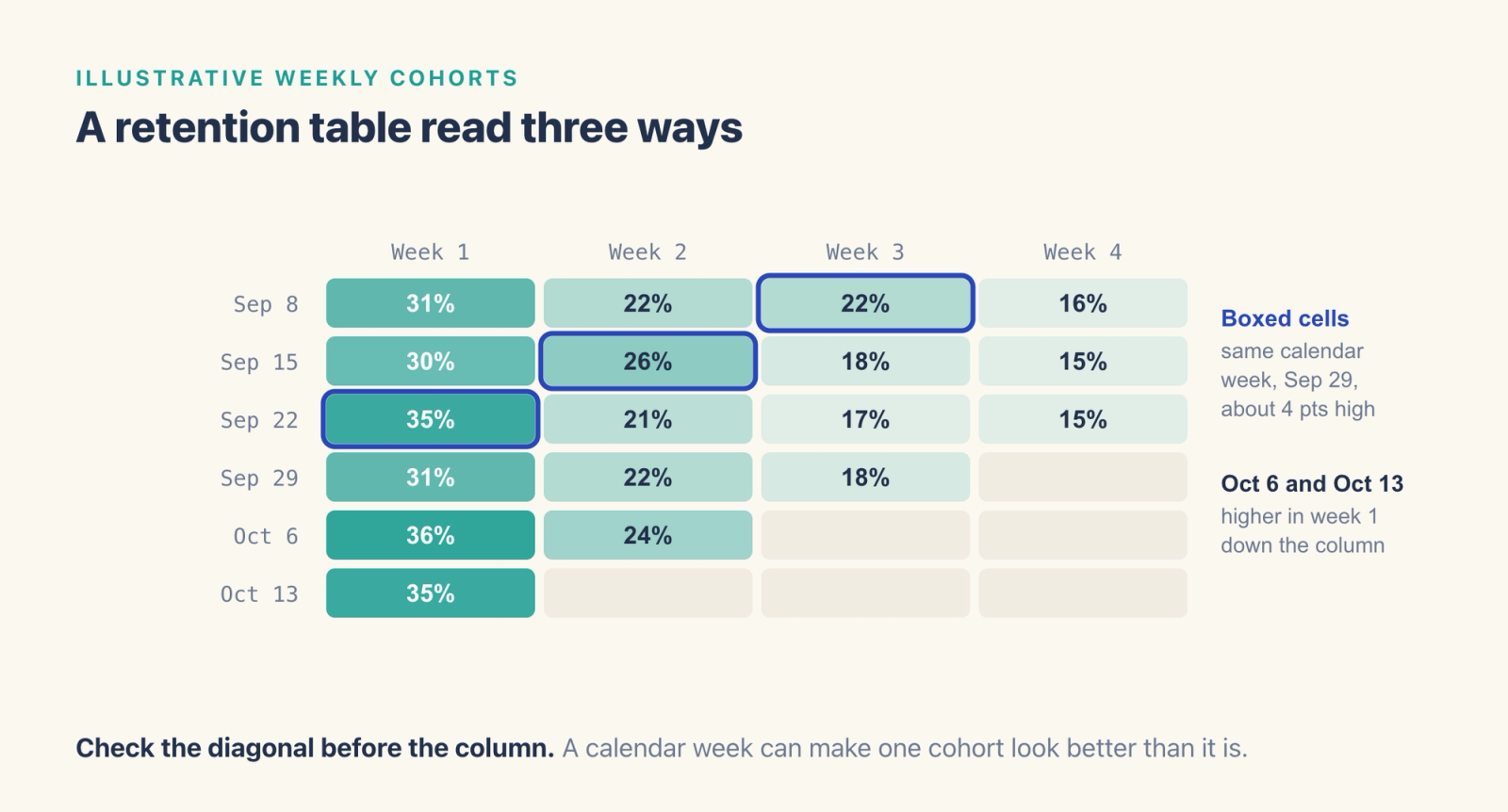
Check the diagonal first to avoid a wrong conclusion. Without it, the Sep 22 cohort's 35% in week 1 looks like a better cohort. With it, the higher numbers line up on one calendar week across three cohorts, which makes a calendar effect the likelier explanation.
A game example, start to finish
Say your team ran a limited-time event and wants to know whether it helped retention. The obvious comparison is return rates for players who joined the event against players who did not.
- Build the behavioral cohort. Everyone who completed at least one event mission during the event window.
- Build the comparison group. Players who were active during the same window and did not join.
- Compare retention after the window closes. Settle both groups when the event ends, use the end date as day 0 for both, and compare D1, D7 and D14 return rates. Counting from the end keeps the event's own days out of the comparison.
You will likely see higher return rates for the event players at first, partly because players who join events tend to be more engaged already. Check activity in the week before the event for both groups. To get closer to the event's own effect, narrow both groups so they start alike, for example the same install week, the same level range and similar activity before the event. If you match the groups on these traits, they become more alike on what you measured, and differences you did not measure can still remain.
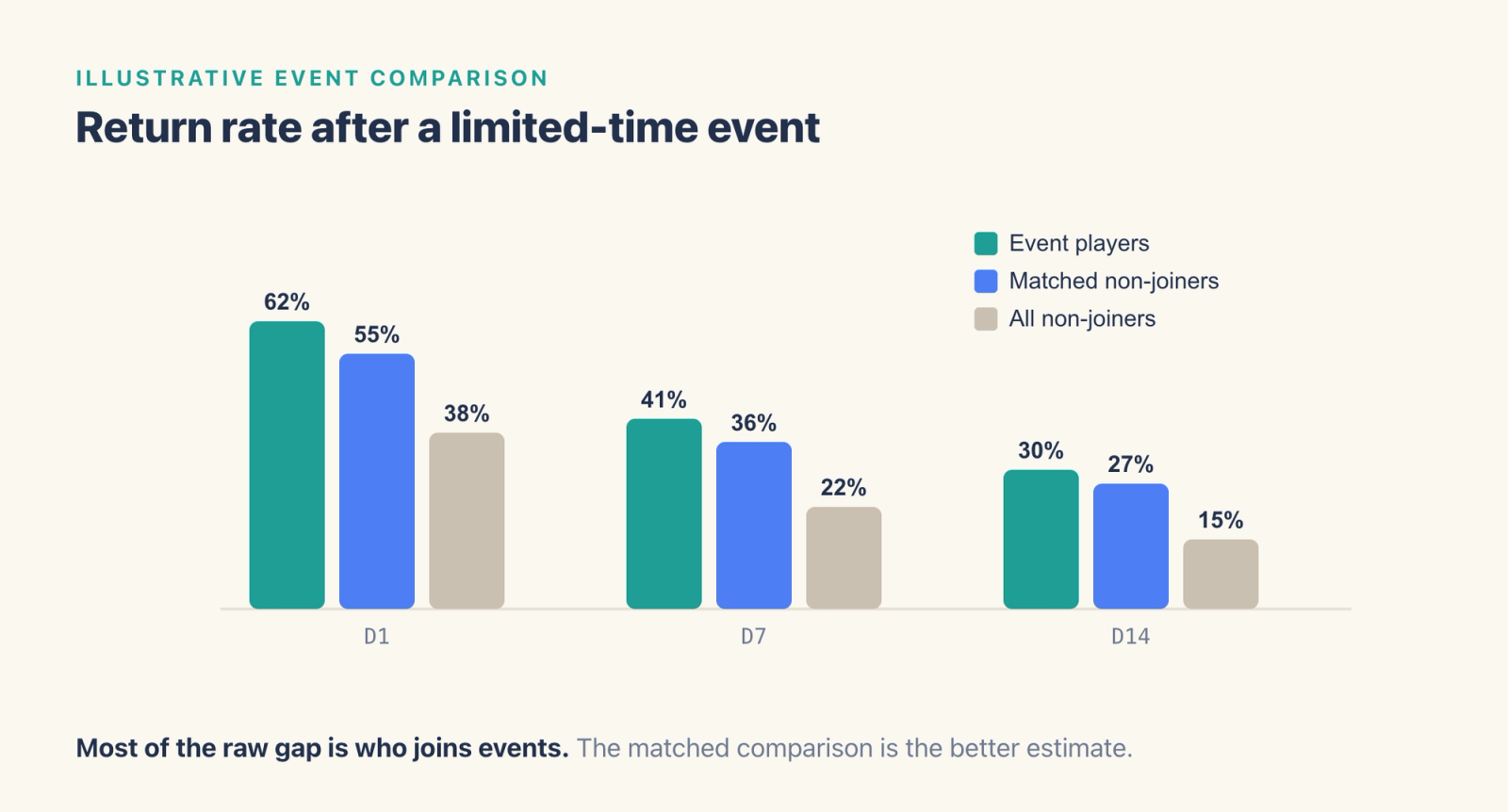
For a causal answer, randomly assign eligible players before launch so that a share of them never see the event, and compare retention by assigned group, including players who were offered the event and skipped it. When the event is planned ahead, set up that holdout before launch.
Cohort analysis in SQL
The query below is a sketch for a generic events table with user_id, event_name and event_time columns. It assigns each user to an install week and counts how many come back in each later week.
WITH installs AS (
  SELECT user_id, DATE_TRUNC('week', MIN(event_time)) AS cohort_week
  FROM events
  WHERE event_name = 'install'
  GROUP BY user_id
),
cohort_size AS (
  SELECT cohort_week, COUNT(*) AS users
  FROM installs
  GROUP BY cohort_week
),
activity AS (
  SELECT DISTINCT e.user_id, i.cohort_week,
         DATE_DIFF('week', i.cohort_week, DATE_TRUNC('week', e.event_time)) AS week_n
  FROM events e
  JOIN installs i ON i.user_id = e.user_id
  WHERE e.event_name = 'session_start'
)
SELECT a.cohort_week,
       a.week_n,
       COUNT(DISTINCT a.user_id) AS retained_users,
       ROUND(100.0 * COUNT(DISTINCT a.user_id) / MAX(c.users), 1) AS retention_pct
FROM activity a
JOIN cohort_size c ON c.cohort_week = a.cohort_week
WHERE a.week_n BETWEEN 1 AND 4
GROUP BY a.cohort_week, a.week_n
ORDER BY a.cohort_week, a.week_n;
The query divides each week's returning users by the full install cohort from cohort_size, so users who installed and never opened a session still count in the denominator. Date functions differ between databases, so adjust DATE_TRUNC and DATE_DIFF for your database.
Mistakes that skew cohort analysis
- Cohorts too small to read. Small cohorts can swing from one week to the next through chance alone. Merge daily cohorts into weekly ones, judge a difference against the cohort sizes behind it, and wait for a pattern to repeat before you act on a small difference.
- Mixing cohort age with calendar date. Day 7 means seven days after each user's own start. Compare cells at the same day N to judge cohorts at the same age, and compare cells from the same calendar week, along the diagonal, to look for calendar effects.
- Averaging percentages across cohorts. If you average the percentages directly, a cohort of 500 counts as much as a cohort of 9,000. Add up the retained users and the cohort sizes separately, then divide.
- Filtering by a later action. "Users who made a purchase" includes only users who stayed long enough to buy, which tends to make their retention look better. Define the cohort by what happened before the retention clock starts.
How to run cohort analysis in Agentic Engine
In Agentic Engine, Retention Analysis measures how different batches of new users perform. You set the first event and the return event, choose the entity, and analyze by day, week or month. When install or registration is the first event, each dated row of the table is an acquisition cohort, below an overview row for the whole period.
In Cohorts, you can create Behavioral, SQL, ID and Result cohorts. A Behavioral cohort is defined by events and properties, an SQL cohort by a query, and an ID cohort by an imported list of IDs. A Result Cohort is created from a user count in an analysis result table. Behavioral and SQL cohorts are recalculated from their rule, so membership follows the rule each time. ID and Result cohorts save a set of IDs directly. You can update an ID cohort by importing a new file, and a Result cohort keeps the IDs it was created with. Fixed membership suits a two-group comparison like the event example. The Cohorts documentation includes a similar example, a cohort of "Participants of a specific event" that can be used to analyze the event's impact on retention.
Cohorts can be used as filters and as group-by items. To compare event players with a matched group, save the two groups as separate cohorts, filter Retention Analysis to users in either one, and group by the event-player cohort. Retention Analysis includes users who completed the first event you configure and measures returns from that event's date. If you pick a login on the event's end date as the first event, members who did not log in that day drop out of both groups. To count every member from the same day 0, adapt the SQL pattern above. Replace the install cohorts with the two groups' saved member lists, use the event's end date as day 0, count distinct members who return on D1, D7 and D14, and divide by each group's full size. Cohorts are pre-computed and can also serve as the audience for operations, so you can use the same cohort for a follow-up message after you have reviewed the result.
Frequently asked questions
What is cohort analysis?
In cohort analysis, you group users by a shared starting point, such as install week or joining an event, and compare the groups at the same number of days after that start. It shows whether newer users or a specific group behave differently from others.
What is the difference between a cohort and a segment?
An acquisition cohort is defined by a fixed starting period, such as everyone who installed on October 6, so its members stay the same. A live segment contains whoever matches a condition right now, so its members change over time. Rule-based behavioral cohorts can also change when they are recalculated.
What is an example of a cohort analysis?
A team compares week 1 retention for weekly install cohorts before and after a new tutorial. If the cohorts after the change return more often in week 1, the result is consistent with the tutorial helping. A randomized test is how you find out whether the tutorial caused the difference.
How do you read a cohort analysis table?
Read across a row for one cohort's decay, down a column to compare cohorts at the same age, and along a diagonal for calendar events that touched every cohort in the same week.
How do you do cohort analysis in SQL?
Assign each user to a cohort by their first event date, calculate how many periods later each return event happened, then count distinct users by cohort and period. Divide by the cohort size to get retention.
Where to go next
Use cohort analysis to see when behavior changes. To look for reasons, examine what users did before they left with behavioral analytics, group them by those actions with behavioral segmentation, and break a churn number down by cohort with churn rate analysis. To put a value on each cohort, see the LTV formula for games and apps.